Features · The complete reference

Everything Road Voyage does, in detail.

Eight things no other RV planner ships together. Each built specifically for how RVers actually plan, drive, and adapt — not just translated from a generic road-trip app.

Jump to 01Travel Day 02RV-safe routing 03POI inventory 04Cascade edits 05Family sharing 06Print + offline 07Custom pins 08Search
01
The atomic unit

Travel Day organization — the unit of RV travel, finally treated like one.

Most apps treat a trip as a route with stops sprinkled on top. Road Voyage treats it as a chain of Travel Days — each with its own start, end, miles, hours, food preset, camp pick, weather, and grade warnings.
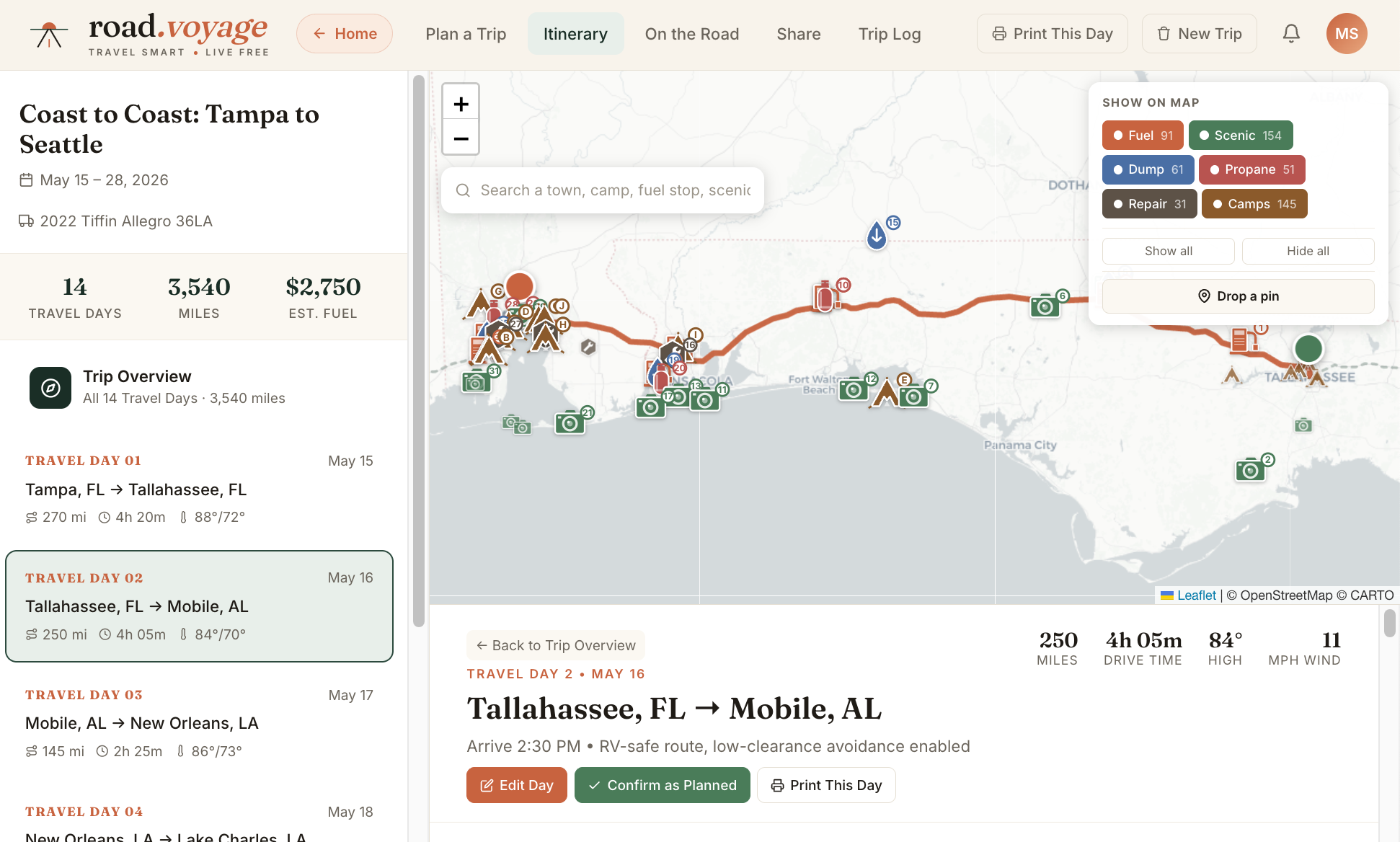
  • Each day is editable as a unit. Change one Travel Day's hours; subsequent days cascade automatically.
  • Status tracking per day. Planned · Confirmed · Modified · Pending — visual indicators across every surface.
  • Per-day budget. Fuel + camp + food preset + tolls + entries, computed from the day's actual numbers.
  • Per-day camp pick. Choose from 5–10 curated options with A/B/C/D selection that feeds back into day cost.
See a Travel Day in the demo trip
05
Tampa, FL → Tallahassee, FL
274 mi5h 40m$108 fuel
Confirmed
06
Tallahassee, FL → Mobile, AL
328 mi6h 12m$128 fuelSplurge food
Modified
07
Mobile, AL → New Orleans, LA
153 mi3h 02m$60 fuel
Confirmed
02
No more low bridges

RV-safe routing — the route the GPS won't quietly send you under.

Powered by HERE Truck Routing API. Every route honors your RV's actual height, length, weight, and fuel constraints. No cookie-cutter "shortest path" that ends in a propane-no-go bridge or a 12-foot underpass at 14 feet of clearance.

  • Height clearance enforcement. 13'6" through 14' RVs avoid clearances under their height + 6 inches buffer.
  • Length restrictions. 40-foot Class A doesn't get routed onto a 25-foot residential cul-de-sac.
  • Weight limits. Bridge GVW limits respected, especially on rural and forest service roads.
  • Propane-no-go detection. Tunnels with propane bans flagged; alternative routes proposed automatically.
  • Grade warnings. 7%+ descents flagged with "engine brake required" callouts on known truck danger zones.
See routing on the Tampa→Seattle demo
A B REROUTED
13'6" height
32 ft length
22,000 lbs
Propane aware
03
~400 along every route

Comprehensive POI inventory — everything along the route, filterable.

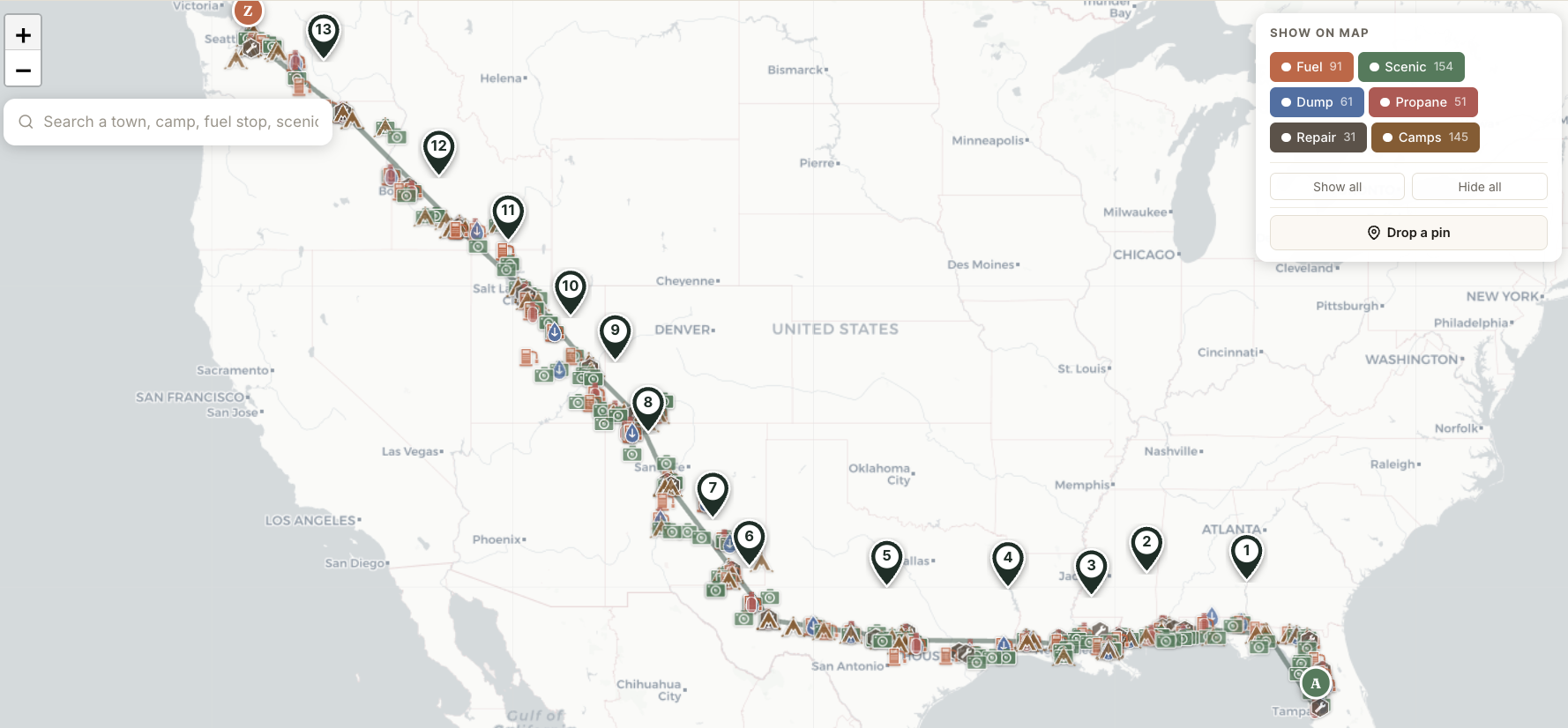
Six categories curated to your route: Fuel · Scenic · Dump · Propane · Repair · Camps. ~400 points of interest across the demo trip alone. Toggle filter chips to show or hide each category. Search across all of them to find a specific town, attraction, or stop.
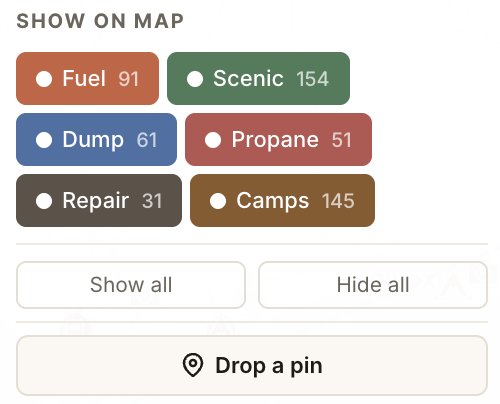
  • Source-of-truth data per category. Recreation.gov for federal lands, Campendium for private RV parks, KOA + Harvest Hosts for member networks, GasBuddy for fuel pricing, AmeriGas + Suburban for propane.
  • Refreshed on appropriate cadences. Camps weekly, fuel daily, scenic stops quarterly.
  • Coordinate-anchored, not day-segregated. POIs along the entire route show up consistently — no jumping between different views.
  • Curation algorithm picks 5–10 per category per Travel Day from the broader pool. Right-sized for the day, not overwhelming.
See the POI map on the demo
Fuel 85
Scenic 120
Dump 50
Propane 40
Repair 25
Camps 95
Buc-ee's, Madisonville TX
3.2 mi
Big Bend Scenic Overlook
14.8 mi
KOA Holiday — Pecos River
28.1 mi
Loves Dump — Exit 372
45.6 mi
04
When reality changes

Real-time cascading edits — cascade what reality changed.

Day 6 added 47 miles? Day 7's start coord shifts east. Mileage recomputes. Dates ripple forward. The rest of the trip auto-corrects so you don't have to redo a spreadsheet on the road.

  • Geographic cascade. A day's end coordinate becomes the next day's start; the cascade interpolates camp positions along the new route.
  • Recursive day-split. When an edit pushes a day past your preferred max miles, the app proposes splitting into two days — recursively, across multiple impacted days.
  • Status lifecycle. Modified days flag as "pending" until you review; confirmed days lock in place.
  • All edits persist. localStorage in the prototype, Postgres in production — cascade state survives reloads and family-member edits.
See cascade in action
Before edit
Day 5
270 mi
Day 6
280 mi
Day 7
305 mi
Day 8
290 mi
Day 9
260 mi
After Day 6 +47 mi · cascade
Day 5
270 mi
Day 6
327 mi
Day 7
295 mi
Day 8
278 mi
Day 9
260 mi
05
Up to 5 members

Family sharing — one trip, the whole family.

On the Family plan, up to 5 members share full edit access to every trip. Co-drive, co-plan, or just keep everyone informed. On Pro, share trips publicly via slug-based read-only links for friends not on the plan.

  • Real-time edits — Server-Sent Events push changes as they happen. Your partner edits Day 8; you see it on your screen within seconds.
  • Last-write-wins (Phase 1) — Sequential editing handled gracefully; concurrent CRDT-style editing comes in Phase 2 if data shows it's needed.
  • Public share linksroad.voyage/t/atlantic-coast-2026. Read-only, indexed by Google, perfect for sharing with non-family.
  • Encrypted private share — On Pro, generate a tokenized URL with passphrase that bypasses public indexing.
Pricing for the Family plan
Atlantic Coast 2026
14 days · Tampa → Seattle · 3,247 mi
Family
SM
DM
JK
RM
+
4 of 5 seats
06
Works in dead zones

Print + offline — Idaho-Oregon border without panic.

Save the entire trip to PDF for the glovebox. Cover page + 14 day-by-day reference pages. Or use offline mode — the service worker caches your active trip and ~50MB of map tiles around the route.

  • Cover page — Trip summary, RV info, total budget, custom-stops list with SVG schematic snippets.
  • Per-day pages — Route directions with highway shields, weather + alerts, elevation profile, numbered stops, camp pick details, today's budget.
  • Offline read — All trip data cached in browser; map tiles cached in service worker. Idaho-Oregon border or Wyoming high plains: no degraded experience.
  • Edit queue — Edits made offline queue up and sync when reconnected. No data loss.
See a sample printed trip
07
Drop your own

Custom-pin drop — that Walmart you want to overnight at, the diner your sister-in-law swears by.

Click anywhere on the map to drop a custom stop. Name it, see nearby POIs, assign it as a Travel Day's start or destination — or just keep it as a floating reference. Custom stops persist, sync, and print.

  • One-click drop. Click map → name appears → dropdown to assign to a specific Travel Day.
  • Nearby-POI list. When you drop a pin, the 5 closest POIs from the inventory appear automatically — see what's actually around your new stop.
  • Assign as Travel Day endpoint. Move a Travel Day's start or destination to your custom pin via dropdown.
  • Persists in print. Custom stops with SVG schematic snippets show up on the cover page of your printed trip.
Try the drop-pin in the demo
+ Sara's Diner Custom stop · 1.2 mi off route ASSIGN TO DAY 6

Watch the Tour or Try The Demo

This is a free demo of the RV trip planning tool we are building for the community. Before we take it too far, we want to share it with you and get your feedback. Please send your 2-cents to brad@road.voyage and register your email for newsletters and updates.